Delayed conversions in Google Ads: why you should wait before judging a campaign

KEY TAKEAWAYS
- Google Ads reports a conversion against the day of the click, not the day of the sale. So the last week or two of data is always incomplete.
- Spend shows up straight away. Conversions don't. That makes recent CPA look worse and recent ROAS look lower than they really are.
- Most conversion value lands within two weeks, but not all of it. For one of our ecommerce clients, 21% of conversion value came in more than a day after the click, and 10% more than two weeks after.
- Give a campaign 7 to 14 days before you judge it. Longer if your customers take longer to decide.
We had a client recently where a day's conversion value and ROAS looked soft the morning after. A week later, the same day had almost doubled. Nothing in the account had changed. Google had just caught up.
It's one of the most common traps in paid search. You check yesterday's numbers, they look flat, and the instinct is to cut a budget, pause an ad group or drop a ROAS target. But yesterday's numbers aren't finished yet.
Below we cover why Google Ads reports conversions late, what Google’s own documentation says about it, and how long we recommend waiting before making a call.
Why does Google Ads report conversions late?
There are four reasons, and they stack on top of each other.
1. Conversions are counted on the day of the click
This is the big one. Google Ads' main Conversions column is calculated on the time of the click, not the time of the conversion. If someone clicks your ad on Monday and buys the following Thursday, that sale is added to Monday.
So Monday's numbers keep changing for days, sometimes weeks, after Monday has ended.
2. People don't buy straight away
A lot of customers click, leave, compare, and come back later. Google gives each click a conversion window of 30 days by default, and you can set it anywhere from 1 to 90 days. Any conversion inside that window still gets credited back to the original click date.
The longer and more considered the purchase, the longer the tail. A $40 order and a $4,000 sofa will behave very differently.
3. Google needs time to process the data
Even conversions that happen on the day aren't always reported on the day. Google notes that reporting lags can take up to 24 to 48 hours, and recommends waiting that out before comparing results.
4. Offline and imported conversions arrive when they're uploaded
If you import leads or sales from a CRM, those conversions only appear once they're uploaded, then get attributed back to the original click. A lead that becomes a sale three weeks later will lift a date range you may have already written off.
What delayed conversions look like in practice
We pulled the conversion lag data from one of our Australian ecommerce clients, across every Google Ads campaign for clicks between July and September 2026. Here's how much of the eventual conversion value had come in after a given number of days.
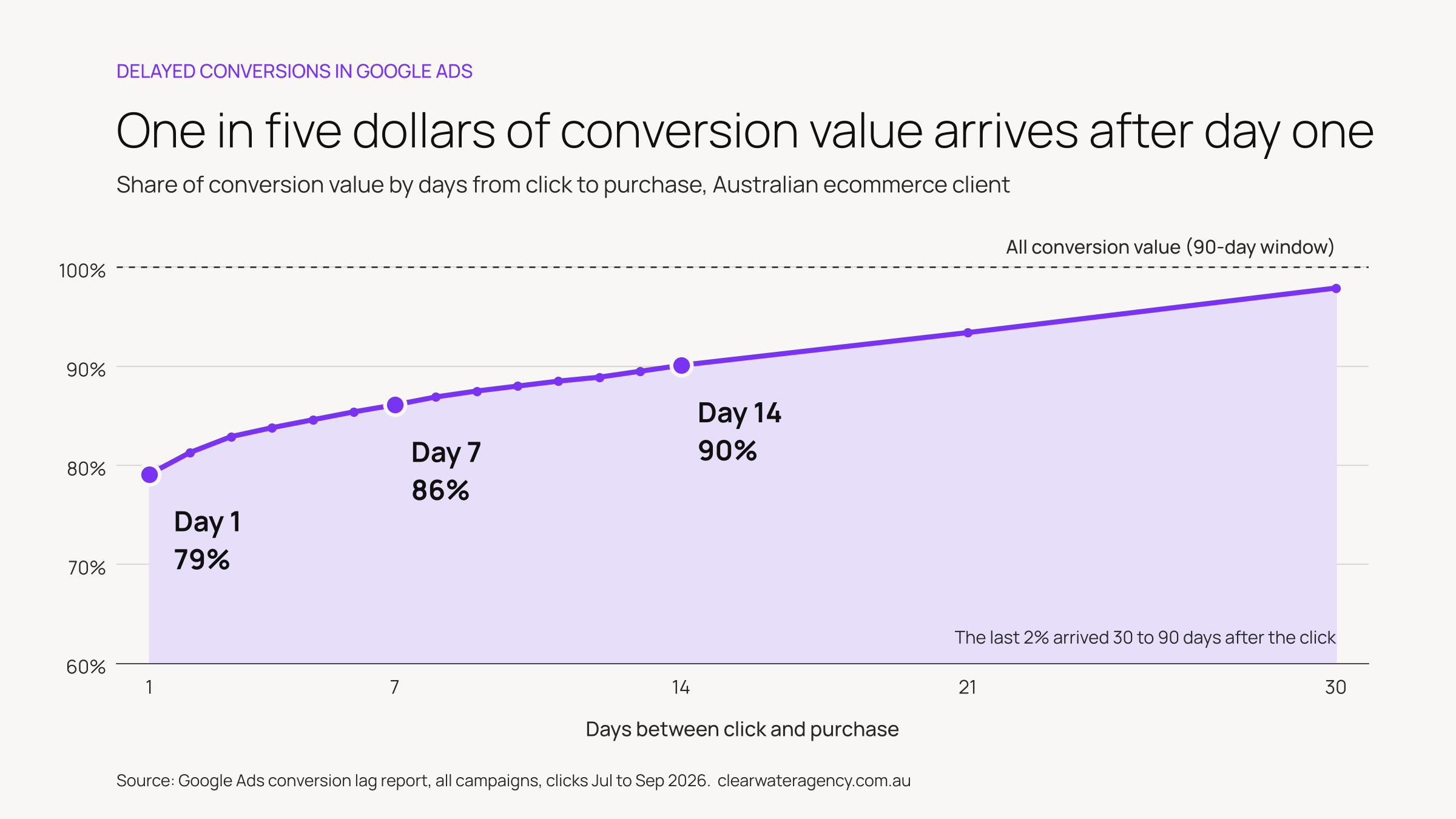
Across the account, 79% of conversion value came from purchases made within a day of the click. That leaves 21% that turned up later: 14% after the first week and 10% after two weeks. On average, a dollar of conversion value arrived about four days after the click.
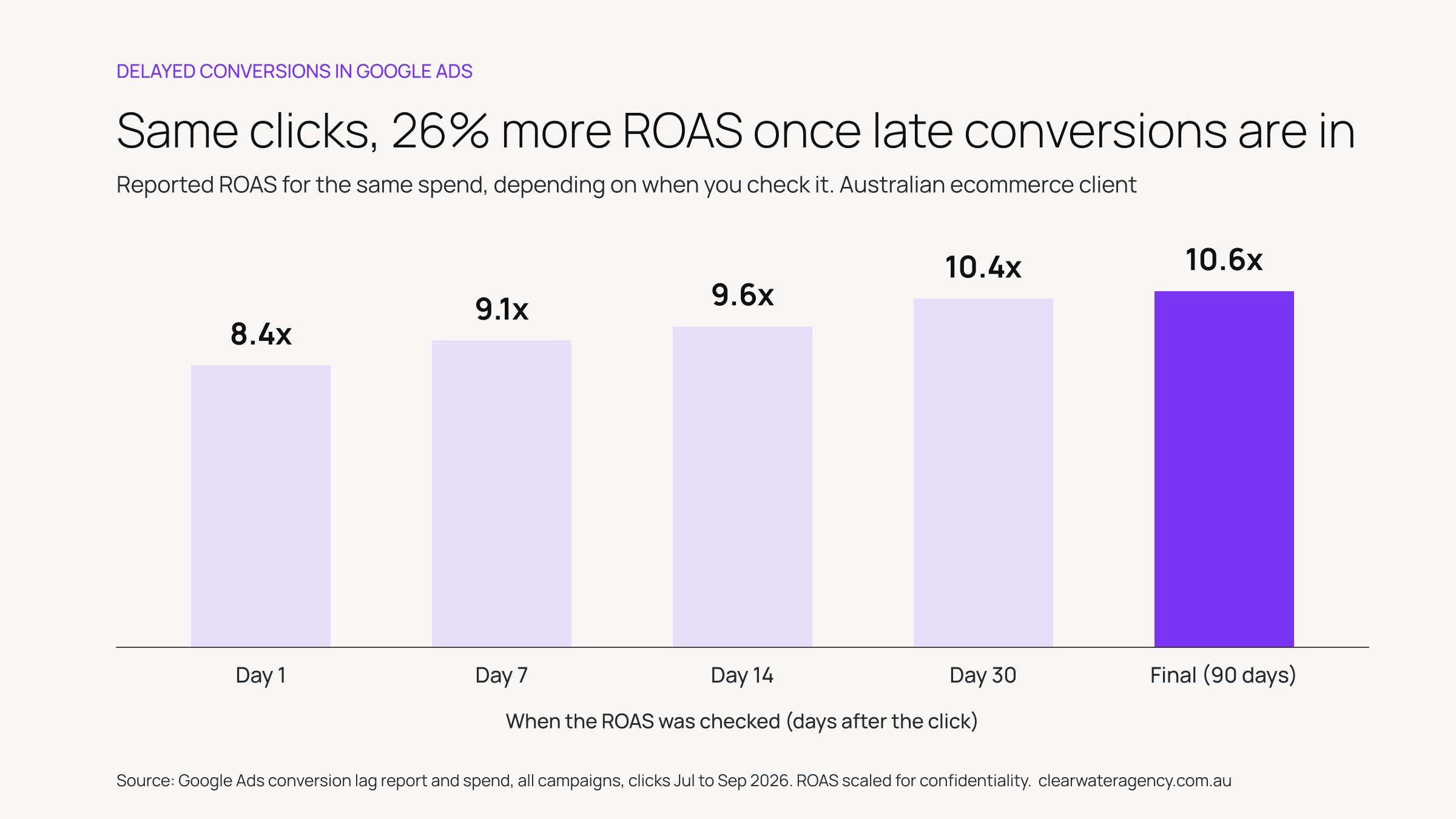
Here's what that does to ROAS. Spend is locked in on the day, so the only thing that moves is conversion value. Check the account's ROAS a day after the clicks and it reads 8.4x. Wait for the full conversion window and the same clicks return 10.6x, 26% higher.
And that's only the customer side. On the same client's Shopping campaign, almost all purchases happened within a day of the click, yet a day's reported conversion value and ROAS almost doubled over the following week. Customers weren't buying later. Google's reporting was catching up.
So if we'd made changes off the day-one number, we'd have been reacting to a result that didn't exist yet.
What does Google say about conversion delay?
Google is pretty clear on this. Its help documentation warns, more than once, that recent performance will look worse than it really is.
It's not just Google either. In November 2025, Microsoft Advertising added a Conversion delay column that shows how many days it takes to collect 90% of conversions, because "conversions rarely happen instantly".
What does the research say?
A 2020 study published at The Web Conference looked at Criteo's ad conversion data. It found:
- 30% of conversions happened within an hour of the click
- Half happened more than a day after the click
- 13% happened more than two weeks after the click
That's display data, and every account is different. But it lines up with what we saw with our client. The first 24 hours is a fraction of the story, and the picture is mostly there by the end of week two.
How long should you wait before changing a Google Ads campaign?
Our rule of thumb is 7 days at a minimum and 14 days for most accounts. If your customers take weeks to decide (B2B, high-ticket items, lead gen that closes offline), wait longer. Your own data will tell you how long.
Here's how we approach it.
- Find your own conversion lag. In Google Ads, add the segment Conversions > Days to conversion to your campaign report. Google recommends ending the date range at least 30 days ago so the data is complete. If 90% of your conversions land within 9 days, that's your waiting period.
- Leave the last 7 to 14 days out of ROAS and CPA decisions. Look at a date range that ended at least a week ago. Recent days are still filling in.
- Use the "by conv. time" columns for a real-time view. The Conversions (by conv. time) and Conv. value (by conv. time) columns count conversions on the day they happened, not the day of the click. They're a better read on what came in this week.
- Watch the leading indicators in the meantime. Clicks, click-through rate, cost per click, impression share and search terms are reported close to real time. If those look healthy, there's usually no reason to panic.
- Give changes time to settle. After a bid strategy or budget change, Google suggests waiting at least two full conversion cycles before judging it. Changing things again too early means you never get a clean read.
- Set the expectation in your reporting. Flag the most recent fortnight in your reports as still coming in, so no one makes a call on half the data.
None of this means ignoring a real problem. A broken conversion tag, a disapproved product feed or a site outage will show up fast, usually as a sharp drop to zero. That's worth acting on straight away. A soft day or two is usually just the lag.
Want a second opinion on your Google Ads performance?
Patience is a big part of running Google Ads well. The accounts that grow are usually the ones that aren't being pulled in a new direction every few days.
At Clearwater, our Google Ads clients work directly with senior specialists, with fortnightly WIPs and monthly performance reviews that look at the full picture, not just yesterday. If your numbers are hard to read or you're not sure whether to make a change, get in touch and we'll take a look.
Frequently asked questions
What is conversion delay in Google Ads?
Conversion delay (or conversion lag) is the time between someone clicking your ad and the conversion being reported. Because Google credits the conversion back to the click date, recent days keep gaining conversions after they've ended.
How long does it take for conversions to show in Google Ads?
Processing alone can take 24 to 48 hours. On top of that, customers can convert days or weeks after clicking, and Google can report a conversion up to 90 days after the click, depending on your conversion window.
Why did my Google Ads ROAS go up after a few days?
Spend for a day is reported almost straight away, but the conversion value for that day keeps coming in as customers who clicked go on to buy. As the value catches up, ROAS rises.
What's the difference between Conversions and Conversions (by conv. time)?
The standard Conversions column reports a conversion on the date of the click. The "by conv. time"columns report it on the date the conversion actually happened.
What is the default conversion window in Google Ads?
30 days for Search and Display clicks. You can set it between 1 and 90 days, depending on the conversion source.
Does conversion delay affect Smart Bidding?
For Smart Bidding campaigns, Google's bid strategy report shows your average conversion delay and estimates how many conversions haven't been reported yet. The bigger risk is people reacting to incomplete data by changing targets or budgets too early.
References
Google documentation
- Understand your conversion tracking data, Google Ads Help
- Understand conversions by time with new columns, Google Ads Help
- Find out how long it takes for your customers to convert, Google Ads Help
- Tips on measuring Smart Bidding performance, Google Ads Help
- About conversion windows, Google Ads Help
- Shopping campaign performance fluctuations: conversion tracking setup and conversion delay, Google Ads Help
Independent research
- Yasui, Morishita, Fujita and Shibata, A Feedback Shift Correction in Predicting Conversion Rates under Delayed Feedback, The Web Conference 2020
Industry
- Asset-level editorial review and other updates for November, Microsoft Advertising blog, November 2025